

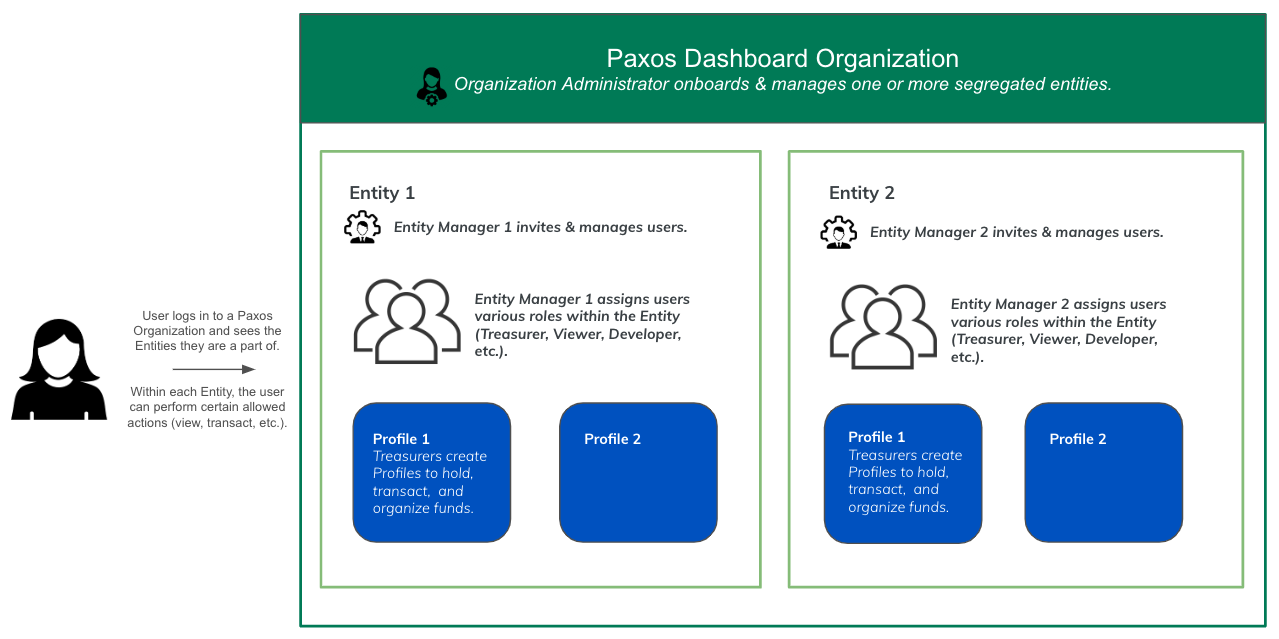
The Paxos Dashboard supports a multi-entity experience, made up of three components: Organization, Entity and Profile. Within the Organization, individual access is selectively provisioned across Entities, so an individual can only access the information and funds and based on their roles within the respective Entity. Most implementations require use of multiple Profiles to organize balances and transactions on the Paxos platform.Documentation Index
Fetch the complete documentation index at: https://paxos-0ac97319-mintlify-dashboard-org-leave-docs-4335.mintlify.app/llms.txt
Use this file to discover all available pages before exploring further.
Organization
When you sign up for the Paxos Dashboard, you are creating Organization Administrator credentials to log into a Dashboard Organization. As the top of the hierarchy the Organization typically maps to the parent of a legal entity or business group, comprising one or more entities. For example, if My Company is comprised of three separate legal entities, My Company Asia, My Company Europe and My Company North America, using My Company as the organization will enable you to onboard the entities, using the legal business names, within the same organization bucket.Entity
Entities, typically mapped to teams, business groups, holding companies, or separate legal entities, are onboarded within the Organization.- Funds are segregated at the Entity level.
- Users belonging to a particular Entity can see balances, transfers, and other information on in the Entity they belong to.
- Roles & Permissions, APIs keys are scoped at an Entity level. For example, if an Organization has 3 entities, User A has a Treasurer role in Entity 1, a Viewer role in Entity 2, and no access to Entity 3. See Roles and Responsibilities.
- Organization Administrators who complete the onboarding for an Entity automatically become the Entity Manager for that new Entity. Entity Managers are allowed to assign roles, add users, map identity provider groups to roles, etc. Entity Managers can be reassigned later
Profile
Every entity has a system-generated default Profile. Most implementations require use of multiple Profiles to organize balances and transactions on the Paxos platform. Profiles are also used to move funds within the same Entity. A Profile is equivalent to a crypto wallet, with the addition of holding your USD (fiat) balance. For example, depositing USD into a Profile is the first step when minting a stablecoin. Those with the Treasurer create Profiles.Leaving an Organization
Users can leave a Dashboard Organization at any time. The process depends on your role and the Organization’s structure.For Non-Admin Users
Users who are not Organization Administrators can leave any Organization at any time:- Navigate to the Organization page.
- Click the Leave Organization option.
For Organization Administrators
Organization Administrators can only leave an Organization under specific conditions: If there are other Organization Administrators:- Navigate to the Organization page.
- Click the Leave Organization option.
- Ensure you transfer any critical responsibilities to another administrator before leaving.
- You can only leave if there are no other users in the Organization.
- If there are other users, you must first promote another user to Organization Administrator or remove all other users before you can leave.